 Nederlands
 English
Variant groups let you group products that belong together. Think of the same product in different quantities (2 pieces, 4 pieces, 6 pieces, etc) or colors (white, blue, green). The products keep functioning independently with their own stock, EAN codes and listings, but you can see at a glance which products are variants of each other.
Creating a variant group
-
Go to Products and open the product you want to set as the main product.
-
Click the action menu and choose Create variant group.
-
Optionally add extra variants right away by searching for products.
-
Click Create variant group to save the group.
The product you create the group from automatically becomes the main product of the group.
The main product
Every variant group has a main product. This is the product that is visible in the product overview. The other variants are not shown separately in the list, but can be reached through the variant group on the detail page.
Managing variants
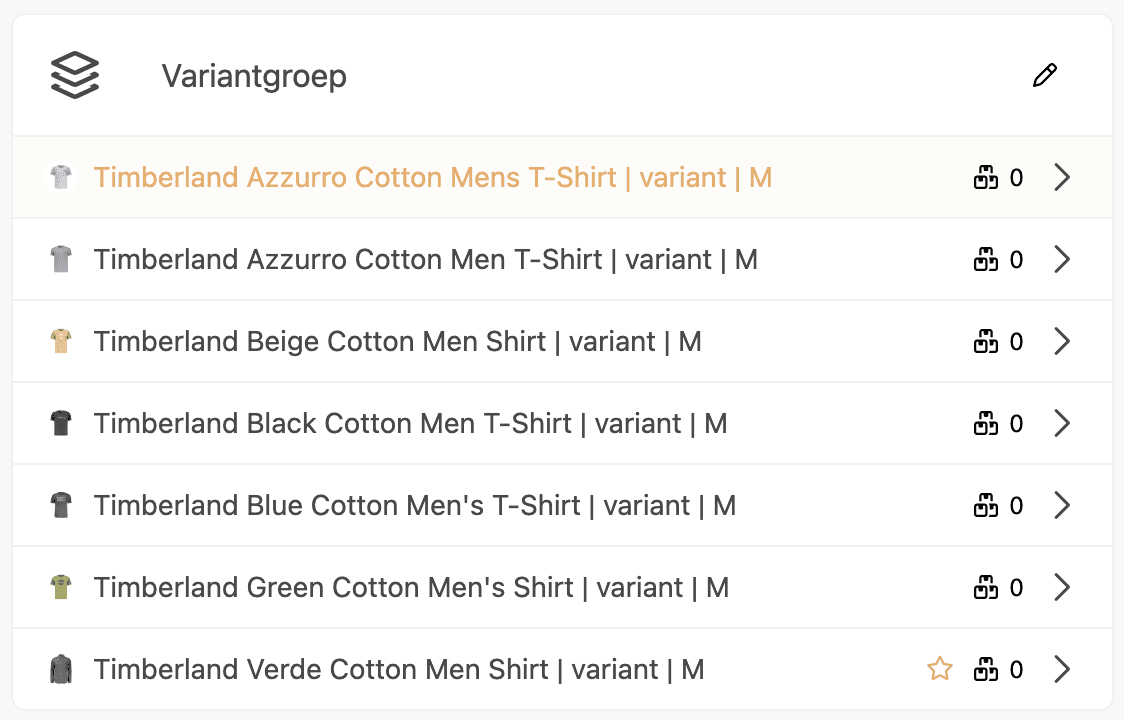
On the detail page of every product in the group you see a card with all variants. Click the edit icon to manage the group:
-
Add variant: add an existing product to the group
-
Change main product: click the star icon next to a variant to set it as the main product
-
Unlink variant: remove a variant from the group. The product itself is not deleted.
Stock in the product overview
In the product overview the main product shows the combined stock of all variants in the group, along with the number of variants. This way you can see at a glance how much stock the entire group has.
The stock of bundle products within the group is not counted, because their stock is derived from the individual products.

Examples
Quantity variants
You sell mugs in different pack sizes:
|
Product |
Type |
Stock |
|---|---|---|
|
Mug White - 1 piece |
Individual (main product) |
120 |
|
Mug White - 6 pieces |
Bundle (6x Mug White) |
20 |
|
Mug White - 12 pieces |
Bundle (12x Mug White) |
10 |
In the product overview you see at the main product: 120 for 3 variants. The bundle stock (20 and 10) is not counted, because it is derived from the 120 individual pieces.
Color variants
You sell size S T-shirts in different colors:
|
Product |
Type |
Stock |
|---|---|---|
|
T-shirt S - White |
Individual (main product) |
45 |
|
T-shirt S - Red |
Individual |
30 |
|
T-shirt S - Green |
Individual |
25 |
|
T-shirt S - Blue |
Individual |
40 |
In the product overview you see at the main product: 140 for 4 variants. All four products are individual, so all stock is added up (45 + 30 + 25 + 40).
Good to know
-
Each product can only be in 1 variant group at a time.
-
If you archive the main product, another product in the group is automatically set as the main product. If there is no other product left, the group is deleted.
-
Variant groups are separate from bundles and stock sources. Each product can be in a variant group, regardless of whether it is a bundle or a stock source product.
-
Using stock sources? Place the stock product together with the subproducts in a variant group to keep them neatly grouped.
-
The EAN codes of all variants in the group are shown combined in the product overview.
